New 2025 download will not open

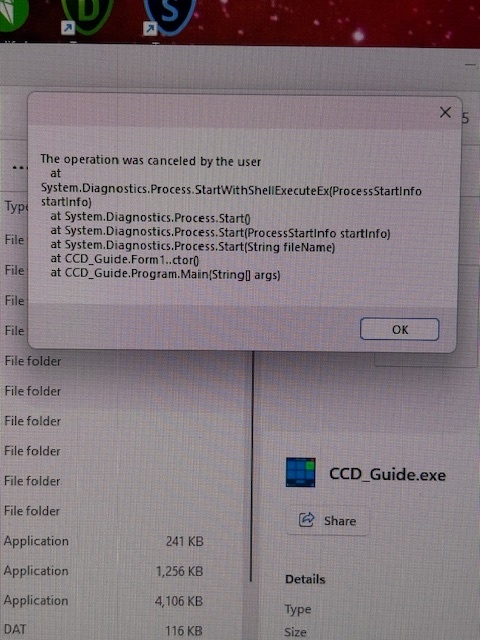
I just order CCDGuide 2025 and downloaded it and it will not open. I get the error message “Operation was canceled by the user at Systems.Diagnostics.Process.et cetera”. I applied the virus exceptions with no luck. I have the 2024 version already and it works fine.

Larry Phillips

Hello Larry,

Did you follow the steps in this document?

Please, send more information (screenshots,…), if you still have problems.

Thanks in advance!

best,

Bernhard

Yes, I did all as described for virus problems. The abobe message is all I get when I try to open the .exe file. The folder is located in my Documents folder as is the 2024 version, which works.

Larry

Hello Larry,

Thanks for the info!

Maybe the Documents folder makes the problems with the 2025 version.

Please, can you test CCD-Guide using a standard path like c:\CCDGuide\ or d:\CCDGuide\.

Please do not forget to exclude the test folder from virus scan.

best,

Bernhard

I did as you suggested and no change. I got the same error message.

Larry

I copied it over to an older Win 11 computer and it works fine. But I am wanting to discontinue using that computer.

Larry

Hello Larry,

Thanks for the info and sorry for the problems.

I will forward this problem to our software developer. I hope, he can help.

best,

Bernhard

Thanks. Perhaps the error message will give him a clue to the problem.

Larry

Hi Larry,

can you send me the full text? Please select the message box text, copy and return here

Thanks

Hartmut

What I provided earlier above as a screen shot is all that I have. Or do you need me to send it again?

Hi Larry,

please start CCD_Guide.exe again and copy the messagebox text for me.

Thanks Hartmut

Hi Larry,

a screenshot is not enough. I need the full text from the messagebox .

Please mark the text (move the mouse to the text, press Ctrl-A followed by Ctrl-C (Copy). Then past the text from clipboard into the answer.

You can do a little more:

create a directory named console in directory \files.

in \files\console you will probably find later a file Console_CCD_Guide.txt containing messages written by CCD_Guide,

This text can help even further.

Good luck

Hartmut


The operation was canceled by the user
at System.Diagnostics.Process.StartWithShellExecuteEx(ProcessStartInfo startInfo)

at System.Diagnostics.Process.Start()

at System.Diagnostics.Process.Start(ProcessStartInfo startInfo)

at System.Diagnostics.Process.Start(String fileName)

at CCD_Guide.Form1..ctor()

at CCD_Guide.Program.Main(String args)

I do not know what you mean by directory \files and where it is located. Is this a Mac term?

OK

Hi Larry,

we don’t speak Mac.

When you walk throug the ccd guide directory, you will find subdirectories as \database, \doc, \files etc. The subdirectory \files is the one I was speaking about.

We can also try another way: from what I’m seeing, you pressed a ccdguide Button (Browser, ObjectTracker, ObjectMarker,..). Each of these buttons call a file like Browser.exe, ObjectTracker.exe,.. So, which button did you press and what happened thereafter? The system says “The operation was canceled by the user”, so, what was your action and why?

Hartmut

I found the files folder and added the console folder. I tried to start CCD Guide and this is what was in that file:

Win32NT
Microsoft Windows NT 10.0.26100.0
1
2025-10-14 09:12:32.743 Start migration from old version Version42

Although the error message says “canceled by the user” all I did was press CCDguide.exe and that error box pops up immediately. I did not press any other buttons.

Just now I pressed browser.exe and I get the message “please run ccd_guide.exe for the first time”.

Larry

Hi Larry,

CCD_Guide will migrate old data to work with Version 2025 and calls Migrate.exe.

Do you see Migrate.exe in the ccdguide directory? Did anything happen (Migrate window pop up)?

if Migrate.exe is available, what happens, if you call this program from the explorer?

And again, can you try to pick more from the message box?

Hartmut

I got the migrate screen to open when I selected Migration.exe. Also the opening window came up. I have selected most of the other .exe files and they now work. I was getting an exception warning which I could ignore, and things would start working. I am currently loading the thumbs. Looks I am good to go for now. I will get back to you after using the program for a while if I am having any more issues. Thanks for your help. I am hopeful it is fixed.

Larry

Hi Larry,

I’m excited to share some great news! The migration tool is no longer required for the current configuration. This means you can fully focus on using CCD_Guide, its powerful tools, and enjoying all the inspiring images.
Hartmut